Production Board
- The Production Board provides a status-wise queue of jobs and their operations across your platform.
- Data on this page is refreshed at every 15 minutes.
- The Expand or Collapse button on the top right-hand side of the screen allows the user to resize the data screen.
- If the Staging & Dispatch is at Job Level:
- The cards displayed would be of job level i.e. component information will not be shown on the cards
- All components of the job should have the same status in order to be displayed in the card.
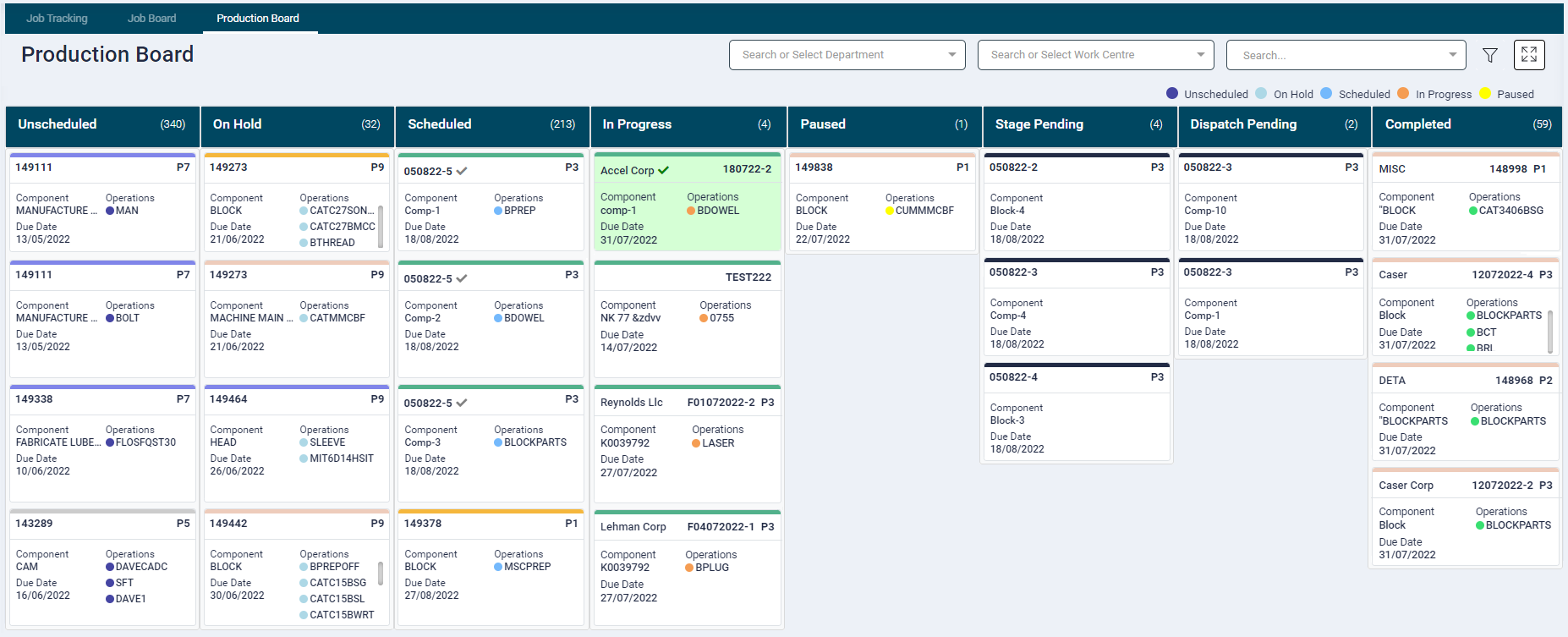
Production Board Setup
- The board setup can be accessed from the Filter at the right-hand side of the screen.
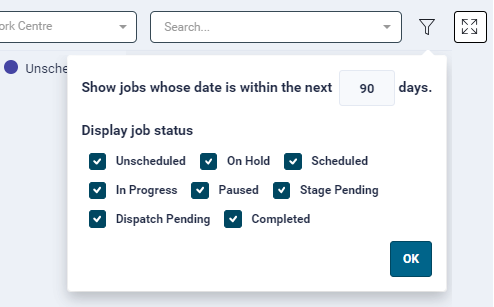
- The first option allows user to filter the data based on job due date. The user can specify the number of days in the input fields. By Default, the data for all jobs whose due date is less than current date + 30 days is displayed.
- Clicking on the column headers, will navigate the user to the detail page, where it lists all the jobs as per the filters applied (if any).
- Display Job Satus: This allows user to setup what columns the user wishes to see based on job status. The following options are available and are selected by default
- Not Scheduled
- On Hold
- Scheduled
- In Progress
- Paused
- Stage Pending
- Dispatch Pending
- Completed
Unscheduled
- All jobs that are yet to be scheduled are placed in this column.
- The jobs are arranged by the order of priority and due date
On Hold
- All jobs that are on hold are placed in this column.
- These jobs are arranged by the order of priority and Due Date.
Missed Schedule
- All jobs that have missed their schedule and have not been rescheduled to a future date
- These jobs are arranged by the order of priority and Due Date.
Scheduled
- All Jobs that are scheduled are placed in this column.
- The jobs are arranged by the order of Schedule from date.
- A red dot will be displayed besides the priority if a job is delayed from it's scheduled time
In Progress
- All Jobs that are in progress on the work centre are displayed here.
Paused
- All jobs that are currently halted paused for any reason are displayed here.
Stage Pending
- Components for which all operations are completed are displayed here.
Dispatch Pending
- All Components that are Dispatch Pending will be displayed here
Completed
- All jobs that have been completed or cancelled are displayed here.
- The jobs are arranged by its time of completion.
These columns will display components X days (as specified in the filter) before and after the current date.
Filters
The filters are per user/per browser.
* By default, all the jobs across the entire shop floor are listed. Select the required Departments and/ Work Centres from the filter at the right-hand side of the screen.
Department
* By default, the jobs from all departments are displayed here.
* User can select one or more department to setup his filter.
* Once a filter is set it remains persistant on the client's browser.
Work Centre
* By default, the jobs assigned to work centres across all departments are displayed here.
* User can select one or more department to setup his filter.
* Once a filter is set it remains persistant on the client's browser.
Job Search
* Job search allows the user to search all searches all components and operations under a certain Job Code.
* When searched by job code, the job will show all operations regardless of the current filters applied.
The filter for very column of the Production Board works on a different date:
* Active and on-hold jobs by their due date
* Scheduled and missed scheduled jobs by their scheduled from date
* In-progress and paused jobs by their work start date
* The completed and cancelled jobs by their work end or cancelled date