Custom Job Fields
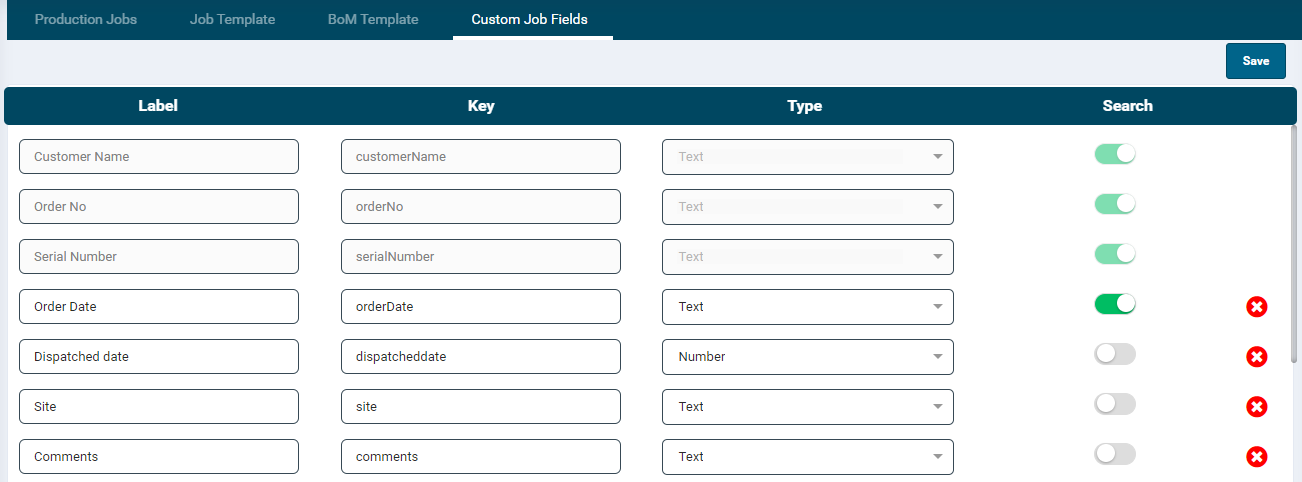
- The Custom Job Fields module allows users to add additional fields in the job configuration section.
- This provides flexibility and customisation options to cater to specific job requirements.
- The listing grid displays the following information:
- Label: The label should be unique. Permissible input is 3-50 alphanumeric characters and decimal numbers.
- Key
- Type
- Search
- The last column allows you to delete a record
- Certain pre-defined job fields such as Customer Name, Order No, and Serial Number are not editable.
- To add a new field:
- Enter a value in the Add Label text box
- The Key will be automatically generated based on the label.
- Select the label type as Text or Number.
- Enable the Search button if the label should be a searchable item in the Production Jobs Search field.
- Click Save to save the record.